utauro
Now in beta · Free early access

Where did your day actually go?

utauro quietly tracks the apps, files, and activities you touch — all day, automatically. No timers, no tags, no manual entry. Local-first by default.

Free while in beta Local-first, private by default
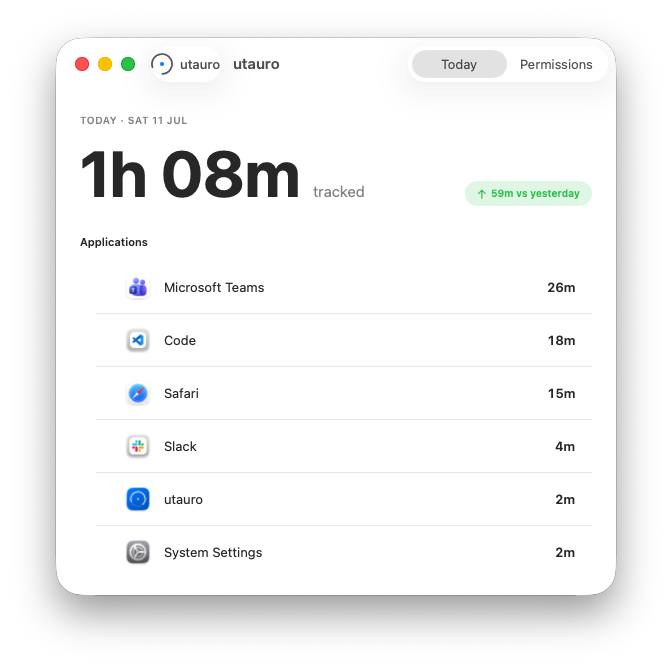
The utauro Today window showing total tracked time and a per-application breakdown

Everything utauro does

A complete picture of your day

utauro watches how you actually spend time on your Mac and turns it into something you can read at a glance. No timers, no tagging, no hidden cloud upload — just clarity.

Automatic

It starts the moment you do

There's nothing to start or stop. utauro sees which app is in front, what document is open, and how long you stay — then files it under the right activity automatically. You never think about tracking again.

  • Zero-config — install and forget
  • Smart categories you can rename anytime
Where an 8-hour day actually goes self-estimate vs. measured · illustrative

Today6h 12m
Development 2h 22m · 38%
Communication 1h 37m · 26%
Writing 1h 14m · 20%
Research 59m · 16%
Breakdown

Where the hours actually went

Every minute rolls up into clear categories with a share of your day. Spot the meeting-heavy afternoons, the deep-work mornings, and the days that got away from you — no spreadsheet required.

  • Daily, weekly, and monthly rollups
  • Compare any two periods side by side
Detail

Down to the exact file

"3 hours in Word" tells you nothing. utauro remembers the actual documents, projects, and browser tabs — so you can see it was the Q3 report, the client proposal, and one very long research rabbit hole.

  • Document- and tab-level history
  • Search your whole history in one box
report 14 results
Q3-Report.docxMicrosoft Word 1h 48m
Client-Proposal-v3Figma 52m
2026 market report — trendsSafari 31m
utauro Today
4h 51mtracked so far today
Development2h 02m
Communication1h 18m
Writing54m
At a glance

Always one click away

utauro lives in your menu bar, not in your way. Click the icon for today's total and your top activities, then get back to work. No dashboard to open, no browser tab to keep alive.

  • Native menu bar app — feather-light
  • Launches at login, runs quietly all day

Private by design

Local-first means local by default.

utauro writes your history to a database on your Mac. Today, nothing is uploaded; future sync or AI features would be opt-in, clearly explained, and separate from the core local tracker.

Read the privacy promise

7h 41m tracked today — 0 bytes uploaded

Yours. Only yours.
No hidden upload.

And the details that matter

Small things, done right

The features you don't notice until they're missing — all built with the same local-first, get-out-of-your-way philosophy.

Local-first

Every activity record starts in a database on your Mac. Sync or AI features would be opt-in, never hidden.

Export anything

Pull your full history out as CSV or JSON whenever you like. It's your data, so it's yours to take.

Light & dark

Follows your system appearance automatically, with hand-tuned palettes for both modes.

Custom categories

Rename, merge, and remap how apps roll up into activities. Make the buckets match your work.

Idle detection

Step away and utauro knows. Breaks and lunches don't inflate your numbers.

Feather-light

Native Swift, no Electron. Sips battery and memory so your Mac never feels it running.

From open to insight

Set up once. Then forget it's there.

utauro is running in under a minute and asks nothing of you afterward. The picture of your day builds itself.

01

Install & grant access

Drop utauro in your Applications folder and give it accessibility permission. That's the whole setup.

02

Just work like normal

Code, write, browse, meet. utauro quietly records what you touch and sorts it into activities in real time.

03

Open the menu bar

Glance any time for today's total and top activities — or dive into the full breakdown down to the file.

Limited early access

See where your day actually goes.

Get early access to utauro. Free while in beta — no card, no account, no catch.

No credit card Cancel the email any time macOS 14+